---
title: How to add a mandate and set alerts?
description: "To view your mandates, go to Activity from your Left Navigation pane, and click on the Mandates tab. It should look like this: You can track your mandates under the Activity section > Notifications"
---
[Skip to content](https://service.asora.com/knowledge-base/mandate-alerts#main-content)

- [Knowledge base](https://service.asora.com/knowledge-base)
- [Releases & Updates](https://service.asora.com/release-notes)
- [Blog](https://asora.com/blog/)
- [Newsletter](https://asora.com/sign-up-newsletter/)
- [Customer Portal](https://service.asora.com/tickets-view)
- [File a Support Ticket](https://service.asora.com/tickets-view/new)
Open main navigation
Close main navigation
- [Knowledge base](https://service.asora.com/knowledge-base)
- [Releases & Updates](https://service.asora.com/release-notes)
- [Blog](https://asora.com/blog/)
- [Newsletter](https://asora.com/sign-up-newsletter/)
- [Customer Portal](https://service.asora.com/tickets-view)
- [File a Support Ticket](https://service.asora.com/tickets-view/new)
Search the Asora Knowledge Base
- There are no suggestions because the search field is empty.
1. [Asora Knowledge Base](https://service.asora.com/knowledge-base?hsLang=en)
2. [Workflow & Alerts](https://service.asora.com/knowledge-base/workflow-alerts?hsLang=en)
April 7, 2025
# How to add a mandate and set alerts?
### Viewing your mandates
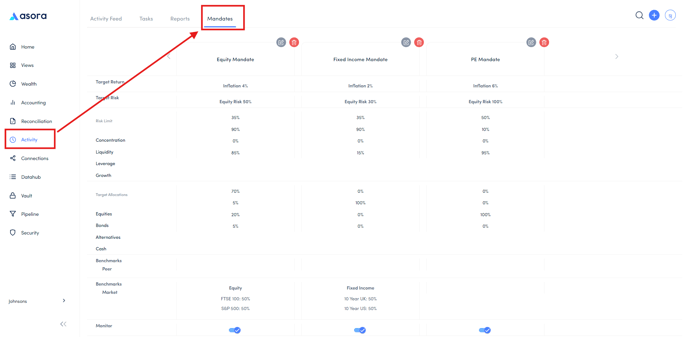
To view your mandates, go to Activity from your Left Navigation pane, and click on the Mandates tab. It should look like this:
### Adding a mandate
Below is a brief note on each of the fields required to create a mandate:
- **Name** – The name of the mandate
- **Objective** – The goal of strategy used on the assets within the account/portfolio. Long term or aggressive would refer to a growth strategy, preservation or cautious refer to defensive strategies, Moderate works either way.
- **Currency** – An option to set a currency for the mandate
- **Mandate** **type** – What class of assets do you expect the accounts/portfolios being monitored to consist of? Options include Multiclass, equities, bonds, alternatives, cash, and others.
- **Time horizon** – The investment period for the accounts/portfolios. If it’s a short-term account, time horizon would be less than 1Y or 1Y-3Y, but Private equity portfolios would usually by 10+Y.
- **Risk profile** – Related to the objective set. If objective is growth (long term or aggressive), risk profile would be on the higher end. On the other hand, if objective is defensive (Preservation or Cautious), risk profile would be lower.
- **Target risk** – Related to risk profile - what % of assets in the portfolio do you want to be of Growth class? Higher the % - more growth assets.
- **Target returns** – The target performance expected for the assets within the accounts/portfolios
- **Risk limits** – Alerts you in the Activity section when there is a breach in the monitored portfolio/account in the following:
- Concentration - % of your top 5 assets in a portfolio/account. For example, if your top 5 assets are 90% of your portfolio, your portfolio is highly concentrated. The target concentration set dictates how much risk is spread across your entire portfolio.
- Liquidity – How quickly the assets can be turned to cash. Any assets with liquidity daily, weekly or monthly are considered liquid
- Growth – Whether the assets follow a growth or defensive strategy
- Leverage - % of portfolio that is liability
- **Target allocations** – How much of your portfolio should be equities, bonds, etc.
- **Create monitor** – Whether you’d like to be alerted when a linked portfolio/account (set in the next steps) breach the limits set in the mandate
- **Peer benchmark** – Compares performance against the performance of the other big investment banks. Eg – ARC benchmarks
- **Market benchmark** – Compares to the market as a whole, Eg – S&P, NASDAQ etc
- **Linked accounts** – Any accounts you wish to monitor on the mandate
- **Linked portfolios** – Any portfolios you wish to monitor on the mandate
### Your alerts
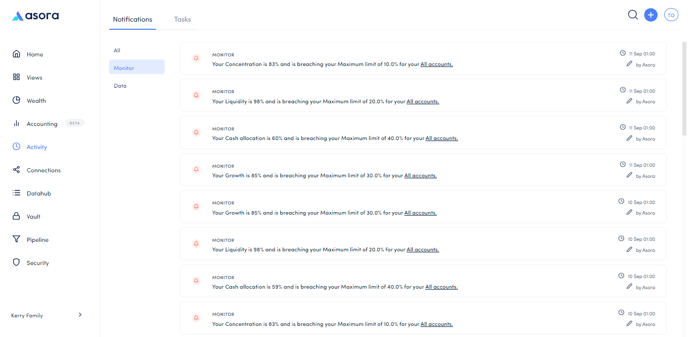
You can track your mandates under the Activity section \> Notifications \> Monitor.
- [Onboarding Guide](https://service.asora.com/knowledge-base/onboarding-guide?hsLang=en#main-content)
- [Getting Started](https://service.asora.com/knowledge-base/onboarding-guide?hsLang=en#getting-started)
- [People & Entities](https://service.asora.com/knowledge-base/onboarding-guide?hsLang=en#people-entities)
- [Accounts](https://service.asora.com/knowledge-base/onboarding-guide?hsLang=en#accounts)
- [Assets & Liabilities](https://service.asora.com/knowledge-base/onboarding-guide?hsLang=en#assets-liabilities)
- [Transactions](https://service.asora.com/knowledge-base/onboarding-guide?hsLang=en#transactions)
- [Reporting](https://service.asora.com/knowledge-base/onboarding-guide?hsLang=en#reporting)
- [Family Admin, Permissions, and Settings](https://service.asora.com/knowledge-base/onboarding-guide?hsLang=en#family-admin-permissions-and-settings)
- [Data Automation](https://service.asora.com/knowledge-base/data-automation?hsLang=en)
- [Performance Monitoring](https://service.asora.com/knowledge-base/performance-monitoring?hsLang=en)
- [Private Assets](https://service.asora.com/knowledge-base/private-assets?hsLang=en)
- [Accounting](https://service.asora.com/knowledge-base/accounting?hsLang=en)
- [Document Vault](https://service.asora.com/knowledge-base/document-vault?hsLang=en)
- [Workflow & Alerts](https://service.asora.com/knowledge-base/workflow-alerts?hsLang=en)
- [Mobile](https://service.asora.com/knowledge-base/mobile?hsLang=en)
[](http://www.asora.com)
20 Hatch Street, Dublin 02, Dublin, Ireland
[mailto:support@asora.com](mailto:support@asora.com)
Copyright © 2025, Asora