---
title: What kind of data is visible on the mobile app?
description: Learn what you can see and access via the Asora mobile app.
---
[Skip to content](https://service.asora.com/knowledge-base/mobile-data#main-content)

- [Knowledge base](https://service.asora.com/knowledge-base)
- [Releases & Updates](https://service.asora.com/release-notes)
- [Blog](https://asora.com/blog/)
- [Newsletter](https://asora.com/sign-up-newsletter/)
- [Customer Portal](https://service.asora.com/tickets-view)
- [File a Support Ticket](https://service.asora.com/tickets-view/new)
Open main navigation
Close main navigation
- [Knowledge base](https://service.asora.com/knowledge-base)
- [Releases & Updates](https://service.asora.com/release-notes)
- [Blog](https://asora.com/blog/)
- [Newsletter](https://asora.com/sign-up-newsletter/)
- [Customer Portal](https://service.asora.com/tickets-view)
- [File a Support Ticket](https://service.asora.com/tickets-view/new)
Search the Asora Knowledge Base
- There are no suggestions because the search field is empty.
1. [Asora Knowledge Base](https://service.asora.com/knowledge-base?hsLang=en)
2. [Mobile](https://service.asora.com/knowledge-base/mobile?hsLang=en)
April 7, 2025
# What kind of data is visible on the mobile app?
The Asora mobile app gives you a quick overview of your wealth picture.
### Home
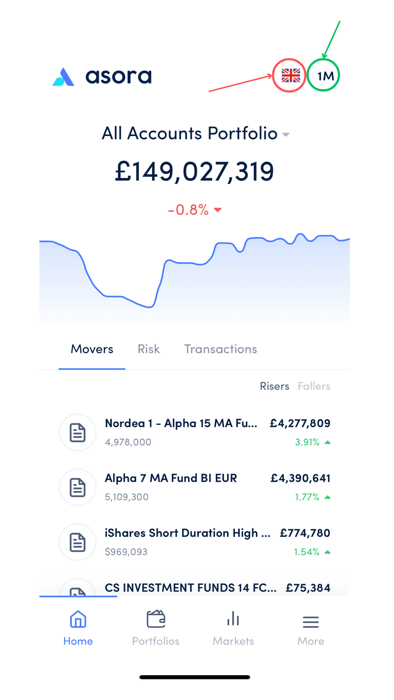
Upon logging in to the app, you can see the **Home**, where you get a view of your portfolio performance, including Movers, Risk, and Transactions. You can choose the currency by clicking on the flag (marked in red) and time period by clicking next to it (marked in green).
### Portfolios
Under Portfolios, you can check your individual portfolios' performance by clicking on its name from the list.
### Markets
### More
The More tab lets you carry out various functions. The below is what you'll see when you click on More:
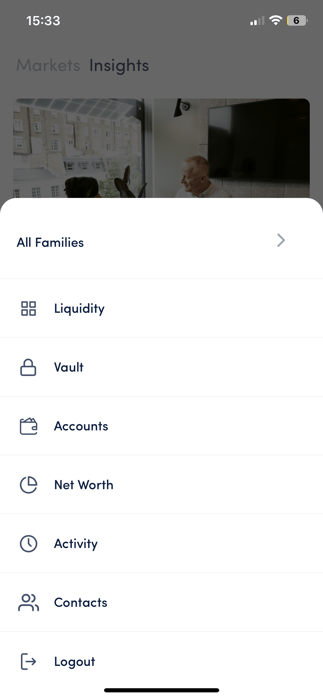
You can access documents under **Vault,** check your bank accounts and [connect them](https://service.asora.com/knowledge-base/connect-bank-account-mobile?hsLang=en) if needed under **Accounts**, get your real-time **Net Worth**, and more.
- [Onboarding Guide](https://service.asora.com/knowledge-base/onboarding-guide?hsLang=en#main-content)
- [Getting Started](https://service.asora.com/knowledge-base/onboarding-guide?hsLang=en#getting-started)
- [People & Entities](https://service.asora.com/knowledge-base/onboarding-guide?hsLang=en#people-entities)
- [Accounts](https://service.asora.com/knowledge-base/onboarding-guide?hsLang=en#accounts)
- [Assets & Liabilities](https://service.asora.com/knowledge-base/onboarding-guide?hsLang=en#assets-liabilities)
- [Transactions](https://service.asora.com/knowledge-base/onboarding-guide?hsLang=en#transactions)
- [Reporting](https://service.asora.com/knowledge-base/onboarding-guide?hsLang=en#reporting)
- [Family Admin, Permissions, and Settings](https://service.asora.com/knowledge-base/onboarding-guide?hsLang=en#family-admin-permissions-and-settings)
- [Data Automation](https://service.asora.com/knowledge-base/data-automation?hsLang=en)
- [Performance Monitoring](https://service.asora.com/knowledge-base/performance-monitoring?hsLang=en)
- [Private Assets](https://service.asora.com/knowledge-base/private-assets?hsLang=en)
- [Accounting](https://service.asora.com/knowledge-base/accounting?hsLang=en)
- [Document Vault](https://service.asora.com/knowledge-base/document-vault?hsLang=en)
- [Workflow & Alerts](https://service.asora.com/knowledge-base/workflow-alerts?hsLang=en)
- [Mobile](https://service.asora.com/knowledge-base/mobile?hsLang=en)
[](http://www.asora.com)
20 Hatch Street, Dublin 02, Dublin, Ireland
[mailto:support@asora.com](mailto:support@asora.com)
Copyright © 2025, Asora