---
title: How to import holdings and transactions
description: One of the most important steps in getting started with Asora is importing your financial data, including holdings and transactions, into the platform. In this guide, we will provide you with a step-b
---
[Skip to content](https://service.asora.com/knowledge-base/import-holdings-transactions#main-content)

- [Knowledge base](https://service.asora.com/knowledge-base)
- [Releases & Updates](https://service.asora.com/release-notes)
- [Blog](https://asora.com/blog/)
- [Newsletter](https://asora.com/sign-up-newsletter/)
- [Customer Portal](https://service.asora.com/tickets-view)
- [File a Support Ticket](https://service.asora.com/tickets-view/new)
Open main navigation
Close main navigation
- [Knowledge base](https://service.asora.com/knowledge-base)
- [Releases & Updates](https://service.asora.com/release-notes)
- [Blog](https://asora.com/blog/)
- [Newsletter](https://asora.com/sign-up-newsletter/)
- [Customer Portal](https://service.asora.com/tickets-view)
- [File a Support Ticket](https://service.asora.com/tickets-view/new)
Search the Asora Knowledge Base
- There are no suggestions because the search field is empty.
1. [Asora Knowledge Base](https://service.asora.com/knowledge-base?hsLang=en)
2. [Data Automation](https://service.asora.com/knowledge-base/data-automation?hsLang=en)
April 7, 2025
# How to import holdings and transactions
One of the most important steps in getting started with Asora is importing your financial data, including holdings and transactions, into the platform.
In this guide, we will provide you with a step-by-step approach on how to import your financial data such as holdings and transactions into Asora, so you can take advantage of its robust features and functionality for better financial management.
### Importing holdings and transactions
The easiest way to import holdings and transactions in bulk is by uploading an Excel document with all the data into Asora. The following excel templates can be used to import data:
1. [Holdings upload excel template](https://service.asora.com/hubfs/asora-holdings-upload-template.xlsx?hsLang=en)
2. [Transactions upload excel template](https://service.asora.com/hubfs/asora-transactions-upload-template%20(Import%20transactions).xlsx?hsLang=en)
To avoid incorrect mapping of data, make sure your holdings/transactions have all the required details as shown in the templates above.
Once your import file is ready, follow the steps shown in the video below to import holdings/transactions into Asora.
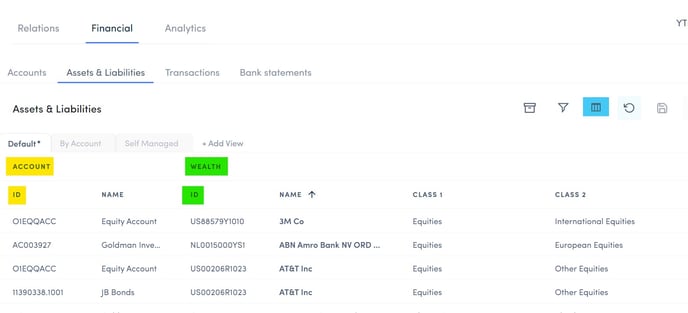
The Account ID and the Asset ID (account\_plain\_id and asset\_id in templates above) are two identifiers that help transactions and holdings to be mapped correctly. Both these IDs can be located in the Datahub \> Financial \> Assets & Liabilities. In the image below, the Account ID is highlighted in yellow and the Asset ID is highlighted in green. If you don't see these columns in your table, you will need to add them to the view by clicking on the Column Selector icon (highlighted in blue) and selecting the respective columns.
- [Onboarding Guide](https://service.asora.com/knowledge-base/onboarding-guide?hsLang=en#main-content)
- [Getting Started](https://service.asora.com/knowledge-base/onboarding-guide?hsLang=en#getting-started)
- [People & Entities](https://service.asora.com/knowledge-base/onboarding-guide?hsLang=en#people-entities)
- [Accounts](https://service.asora.com/knowledge-base/onboarding-guide?hsLang=en#accounts)
- [Assets & Liabilities](https://service.asora.com/knowledge-base/onboarding-guide?hsLang=en#assets-liabilities)
- [Transactions](https://service.asora.com/knowledge-base/onboarding-guide?hsLang=en#transactions)
- [Reporting](https://service.asora.com/knowledge-base/onboarding-guide?hsLang=en#reporting)
- [Family Admin, Permissions, and Settings](https://service.asora.com/knowledge-base/onboarding-guide?hsLang=en#family-admin-permissions-and-settings)
- [Data Automation](https://service.asora.com/knowledge-base/data-automation?hsLang=en)
- [Performance Monitoring](https://service.asora.com/knowledge-base/performance-monitoring?hsLang=en)
- [Private Assets](https://service.asora.com/knowledge-base/private-assets?hsLang=en)
- [Accounting](https://service.asora.com/knowledge-base/accounting?hsLang=en)
- [Document Vault](https://service.asora.com/knowledge-base/document-vault?hsLang=en)
- [Workflow & Alerts](https://service.asora.com/knowledge-base/workflow-alerts?hsLang=en)
- [Mobile](https://service.asora.com/knowledge-base/mobile?hsLang=en)
[](http://www.asora.com)
20 Hatch Street, Dublin 02, Dublin, Ireland
[mailto:support@asora.com](mailto:support@asora.com)
Copyright © 2025, Asora