---
title: Exporting from A-grid tables
description: This article explains how data can be exported from A-grid tables.
---
[Skip to content](https://service.asora.com/knowledge-base/exporting-from-tables#main-content)

- [Knowledge base](https://service.asora.com/knowledge-base)
- [Releases & Updates](https://service.asora.com/release-notes)
- [Blog](https://asora.com/blog/)
- [Newsletter](https://asora.com/sign-up-newsletter/)
- [Customer Portal](https://service.asora.com/tickets-view)
- [File a Support Ticket](https://service.asora.com/tickets-view/new)
Open main navigation
Close main navigation
- [Knowledge base](https://service.asora.com/knowledge-base)
- [Releases & Updates](https://service.asora.com/release-notes)
- [Blog](https://asora.com/blog/)
- [Newsletter](https://asora.com/sign-up-newsletter/)
- [Customer Portal](https://service.asora.com/tickets-view)
- [File a Support Ticket](https://service.asora.com/tickets-view/new)
Search the Asora Knowledge Base
- There are no suggestions because the search field is empty.
1. [Asora Knowledge Base](https://service.asora.com/knowledge-base?hsLang=en)
2. [Data Automation](https://service.asora.com/knowledge-base/data-automation?hsLang=en)
April 7, 2025
# Exporting from A-grid tables
## This article explains how data can be exported from A-grid tables.
A-grid tables on Asora are interactive pivot table grids that provide a comprehensive and detailed view of each account, asset, and liability under consideration. These tables are used across different sections on Asora such as Datahub, Views, Accounting, and so on. The tables can be customised using the column and filter functionality to suit a user's view. Such [customised views can also be saved](https://service.asora.com/knowledge-base/custom-table-views?hsLang=en)for easier and quicker access to specific data.
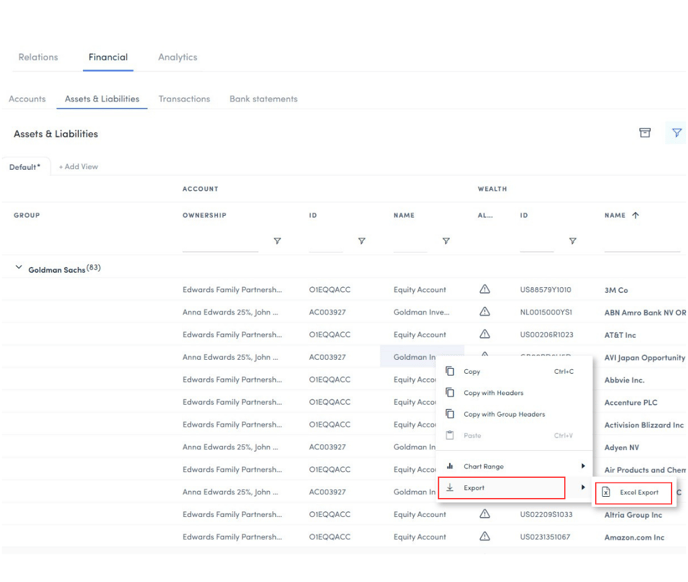
Data from A-grid tables can be exported as Excel files with applied columns, filters, row grouping options, and so on. The video below shows the different ways to customise an A-grid table according to your preferences:
Once your table has been customised according to your preferences, simply **right-click** anywhere on the table to export to an Excel file.
- [Onboarding Guide](https://service.asora.com/knowledge-base/onboarding-guide?hsLang=en#main-content)
- [Getting Started](https://service.asora.com/knowledge-base/onboarding-guide?hsLang=en#getting-started)
- [People & Entities](https://service.asora.com/knowledge-base/onboarding-guide?hsLang=en#people-entities)
- [Accounts](https://service.asora.com/knowledge-base/onboarding-guide?hsLang=en#accounts)
- [Assets & Liabilities](https://service.asora.com/knowledge-base/onboarding-guide?hsLang=en#assets-liabilities)
- [Transactions](https://service.asora.com/knowledge-base/onboarding-guide?hsLang=en#transactions)
- [Reporting](https://service.asora.com/knowledge-base/onboarding-guide?hsLang=en#reporting)
- [Family Admin, Permissions, and Settings](https://service.asora.com/knowledge-base/onboarding-guide?hsLang=en#family-admin-permissions-and-settings)
- [Data Automation](https://service.asora.com/knowledge-base/data-automation?hsLang=en)
- [Performance Monitoring](https://service.asora.com/knowledge-base/performance-monitoring?hsLang=en)
- [Private Assets](https://service.asora.com/knowledge-base/private-assets?hsLang=en)
- [Accounting](https://service.asora.com/knowledge-base/accounting?hsLang=en)
- [Document Vault](https://service.asora.com/knowledge-base/document-vault?hsLang=en)
- [Workflow & Alerts](https://service.asora.com/knowledge-base/workflow-alerts?hsLang=en)
- [Mobile](https://service.asora.com/knowledge-base/mobile?hsLang=en)
[](http://www.asora.com)
20 Hatch Street, Dublin 02, Dublin, Ireland
[mailto:support@asora.com](mailto:support@asora.com)
Copyright © 2025, Asora